1
/
of
1
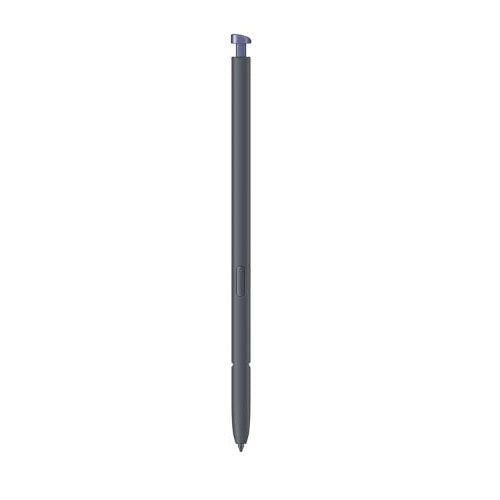
Samsung Galaxy S26 Ultra S Pen
Samsung Galaxy S26 Ultra S Pen
Regular price
KSh9,500.00 KES
Regular price
KSh10,000.00 KES
Sale price
KSh9,500.00 KES
Samsung Galaxy S26 Ultra S Pen Price in Kenya & Full Review The Samsung Galaxy S26 Ultra S Pen price in Kenya is KSh 10,000 Original price was: KSh 10,000.KSh 9,500Current price is: KSh 9,500.. It is a precision stylus designed specifically for the Samsung Galaxy S26 Ultra. It provides a more precise way to write, draw, edit documents and interact with compatible features on the phone’s display. Samsung rates the S Pen at 4,096 levels of pressure sensitivity, allowing the pen to respond to different levels of pressure for more natural writing and drawing. One of the key differences from older Bluetooth-enabled S Pens is that the Galaxy S26 Ultra S Pen does not require charging or Bluetooth pairing. This makes it ready to use whenever it is removed from the phone. Samsung also confirms that Bluetooth-based features such as Air Actions are not supported on this S Pen. The S Pen is useful for more than handwriting. With features such as Screen-Off Memo, S Pen to Text, Quick Notes and Air Command, it can turn the Galaxy S26 Ultra into a practical productivity tool for taking notes, marking documents, sketching ideas and performing supported actions more precisely. Samsung Galaxy S26 Ultra S Pen Full Technical Specifications Specification Details Product Type Smartphone Stylus / S Pen Compatible Device Samsung Galaxy S26 Ultra Pressure Sensitivity 4,096 levels Charging Not required Bluetooth Pairing Not required Bluetooth Features Air Actions not supported Air Command Supported Screen-Off Memo Supported S Pen to Text Supported Quick Notes Supported Water and Dust Resistance IP68 Dimensions 5.0 × 106.3 × 4.15 mm Compatibility note: Samsung states that this S Pen is specifically designed for the Galaxy S26 Ultra and is not compatible with the Galaxy S26 or Galaxy S26+. Key Features Designed for Galaxy S26 Ultra The Galaxy S26 Ultra S Pen is designed to work with the S26 Ultra’s touchscreen and S Pen features. If you are buying it as a replacement, it is important to select the S26 Ultra-specific S Pen rather than assuming that another Galaxy S Pen will provide the same functionality. 4,096 Levels of Pressure Sensitivity The S Pen supports 4,096 levels of pressure sensitivity. This allows the pen to detect changes in pressure, making strokes feel more natural when writing, sketching or drawing. Lighter and heavier strokes can therefore be represented more precisely in supported applications. No Charging Required Unlike Bluetooth-enabled S Pens that require power for remote features, the Galaxy S26 Ultra S Pen does not require charging. You can simply use it with the phone for supported writing and interaction features without having to monitor an S Pen battery level. No Bluetooth Pairing The S26 Ultra S Pen does not require Bluetooth pairing. Samsung specifically confirms that Bluetooth features such as Air Actions are not supported. This is an important distinction for customers replacing an older S Pen and expecting Bluetooth-based remote controls. Screen-Off Memo Screen-Off Memo lets Galaxy S26 Ultra users begin writing while the phone’s screen is off. Removing the S Pen can activate the feature when it is enabled, allowing you to quickly record an idea or note without first navigating through the phone’s applications. S Pen to Text The S Pen can be used to write directly into supported text fields. With S Pen to Text enabled, handwritten input can be converted into typed text, which is useful for entering information into search fields, address bars and other supported text areas. Quick Notes Quick Notes provides a fast way to create a new note in Samsung Notes. Samsung’s support documentation explains that users can press and hold the S Pen button and tap the screen twice to start a new note when the feature is enabled. Air Command Air Command provides access to supported S Pen tools and functions from the Galaxy S26 Ultra. It is designed to make frequently used S Pen features easier to access while writing, editing or navigating supported functions. IP68 Water and Dust Resistance Samsung rates the Galaxy S26 Ultra S Pen at IP68 for water and dust resistance. Samsung’s testing information specifies protection under laboratory conditions, including freshwater submersion of up to 1.5 metres for up to 30 minutes. Water and dust resistance is not permanent and can diminish with normal wear and tear. Useful for Work and Study The S Pen can be useful for students, professionals and other Galaxy S26 Ultra users who frequently write notes, annotate information or work with documents. Its pressure-sensitive input provides a more precise alternative to using a finger on the touchscreen. Useful for Drawing and Creative Work The 4,096 pressure levels make the S Pen suitable for supported drawing and creative applications. Users can create more controlled strokes and adjust the pressure applied to the display when sketching or creating digital artwork. Pros and Cons Pros Designed specifically for Galaxy S26 Ultra 4,096 pressure levels No charging required No Bluetooth pairing required Supports Screen-Off Memo Supports S Pen to Text Air Command support IP68 water and dust resistance Cons Designed specifically for the Galaxy S26 Ultra Bluetooth Air Actions are not supported Limited usefulness if you do not own a compatible Galaxy device Frequently Asked Questions What is the Samsung Galaxy S26 Ultra S Pen? The Samsung Galaxy S26 Ultra S Pen is a precision stylus designed for the Galaxy S26 Ultra. It supports 4,096 pressure levels and features such as Air Command, Screen-Off Memo and S Pen to Text. Does the Galaxy S26 Ultra S Pen need charging? No. The Galaxy S26 Ultra S Pen does not require charging for its supported functions. Does the Galaxy S26 Ultra S Pen use Bluetooth? No. The Galaxy S26 Ultra S Pen does not require Bluetooth pairing, and Samsung confirms that Bluetooth features such as Air Actions are not supported. How many pressure levels does the S26 Ultra S Pen have? The Galaxy S26 Ultra S Pen supports 4,096 levels of pressure sensitivity for precise writing, drawing and editing. Is the Galaxy S26 Ultra S Pen waterproof? The Galaxy S26 Ultra S Pen has an IP68 rating for water and dust resistance. Samsung’s rating is based on laboratory conditions, and water resistance may decrease over time through normal wear. Does the S26 Ultra S Pen work with the Galaxy S26 or S26 Plus? No. Samsung states that the Galaxy S26 Ultra S Pen is not compatible with the Galaxy S26 or Galaxy S26+. Can the S26 Ultra S Pen convert handwriting to text? Yes. S Pen to Text can convert handwriting into text in supported text-input areas after the feature has been enabled. Can I use the S26 Ultra S Pen when the screen is off? Yes. Screen-Off Memo allows you to write notes or drawings with the screen off when the feature is enabled. Where can I buy the Samsung Galaxy S26 Ultra S Pen in Kenya? You can buy the Samsung Galaxy S26 Ultra S Pen from Gadgets Leo in Kenya, subject to current stock and availability, with delivery available countrywide.
Product features
Product features
Materials and care
Materials and care
Merchandising tips
Merchandising tips
Share